Building an Entra Conditional Access library
Writing policies is easy. Proving they respond to real events is the part that matters, so I built a monitoring layer. Entra sign-in and audit logs flow into a Log Analytics workspace, and Microsoft Sentinel sits on top with KQL detections tied to the patterns.
I wanted to do something that sounds boring on paper. Take Microsoft Entra Conditional Access, the thing most teams set up by clicking around a portal, and turn every policy into code I could version, review, and roll back. What I actually got was a few weeks of licensing walls, a Microsoft control that retired mid-project, and one very satisfying moment watching my own monitoring catch a Tor sign-in.
Here is how it went, including the parts that did not go to plan.
Why do this at all
If you have ever inherited a tenant, you know the problem. There are twenty Conditional Access policies, nobody remembers why half of them exist, and everyone is scared to touch them because one wrong change locks people out. No history, no tests, no explanation of what each policy actually defends against.
So my goal was simple. Every policy should live in a repo as code, ship in report-only mode first, carry the attack it defends against (mapped to MITRE ATT&CK), and have a rollback path. If a policy cannot explain itself, it does not belong in the library.
The setup fought me first
The plan was to use a free Microsoft 365 developer tenant. That plan died on day one. Microsoft tightened the developer program under its Secure Future Initiative, and my sign-up came back as "not eligible." So I pivoted to Azure for Students, which got me a tenant I actually owned as Global Admin, plus a 30 day Entra ID P2 trial for the risk based features.
Before writing a single policy, I created two break-glass accounts. These are cloud only Global Admins that get excluded from every policy in the library. This is not optional paranoia. The classic way to lock yourself out of a tenant is a Conditional Access policy that blocks the very admin who wrote it. The break-glass accounts are the escape hatch, and they get built before anything else.
Picking the right tool, twice
My first instinct was Bicep. That was wrong. The Microsoft Graph Bicep extension has no resource type for Conditional Access policies, so it simply cannot deploy them. I moved to Terraform with the azuread provider, which handles Conditional Access properly, including the P2 risk conditions.
But Terraform does not do everything. There is no provider resource for the tenant consent setting or for Privileged Identity Management. Rather than force those into a tool that does not model them, I split the project. Conditional Access goes through Terraform. The consent policy and the two PIM patterns go through Microsoft Graph PowerShell. I wrote that decision down as an ADR so the split reads as a choice, not an accident.
Report-only, always
Every Conditional Access pattern ships in report-only mode. Entra evaluates the policy on every sign-in and logs what it would have done, but enforces nothing. You watch the logs for about a week, confirm no real user would have been blocked, and only then flip it to enforced.
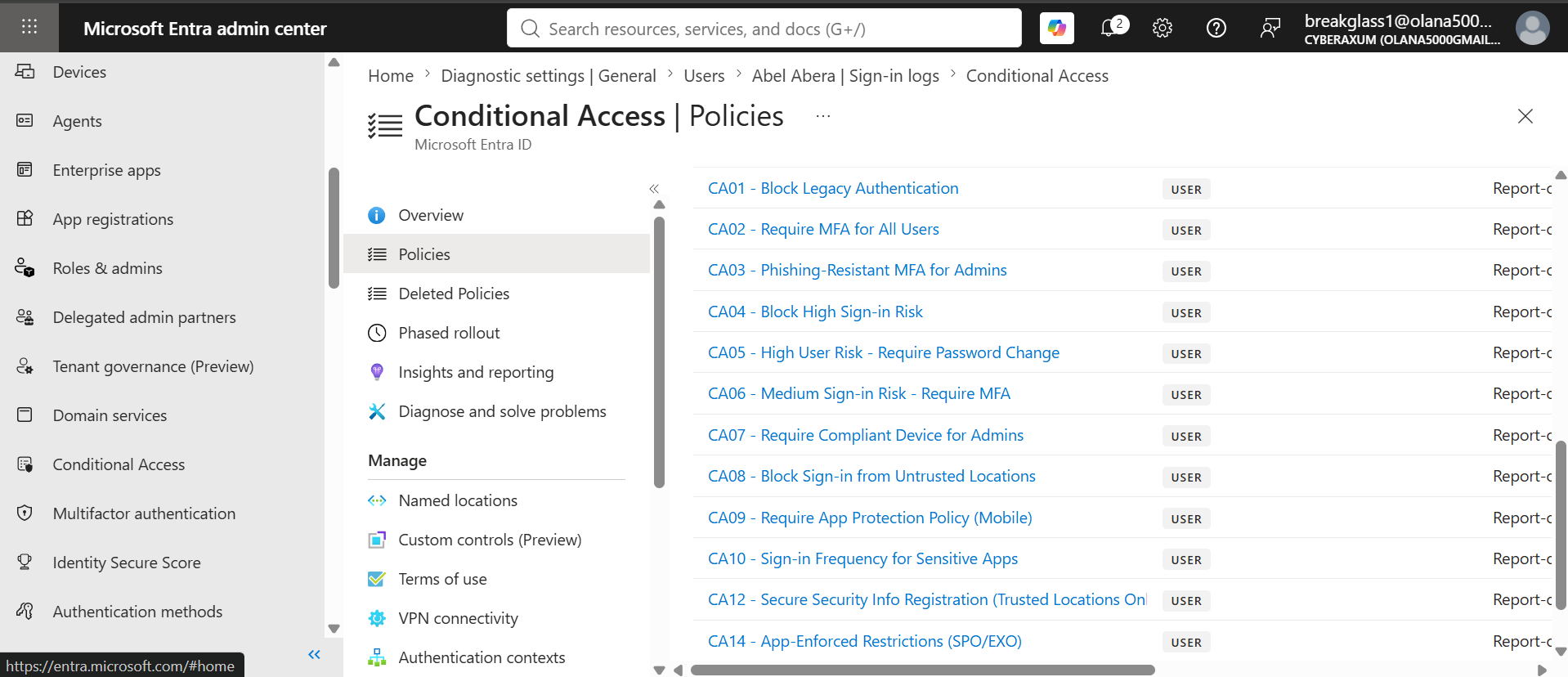
The one that caught me off guard
Around pattern nine I hit a wall that I actually enjoyed. My policy used the "Require approved client app" grant control. When I checked it in the portal, there was a warning: that control retired on June 30, 2026. It is now read only. Most tutorials online still use it.
The replacement is "Require app protection policy," which does the same job and adds a bit more. So I swapped the control, documented the deprecation in the pattern, and moved on. It turned a small trap into a small strength. The library is built against current Entra, not a two year old blog post.
Proving it actually works
Writing policies is easy. Proving they respond to real events is the part that matters, so I built a monitoring layer. Entra sign-in and audit logs flow into a Log Analytics workspace, and Microsoft Sentinel sits on top with KQL detections tied to the patterns.
Then I tested it for real. I opened Tor Browser, signed in as a test user (Abel), and let Entra Identity Protection score the session.
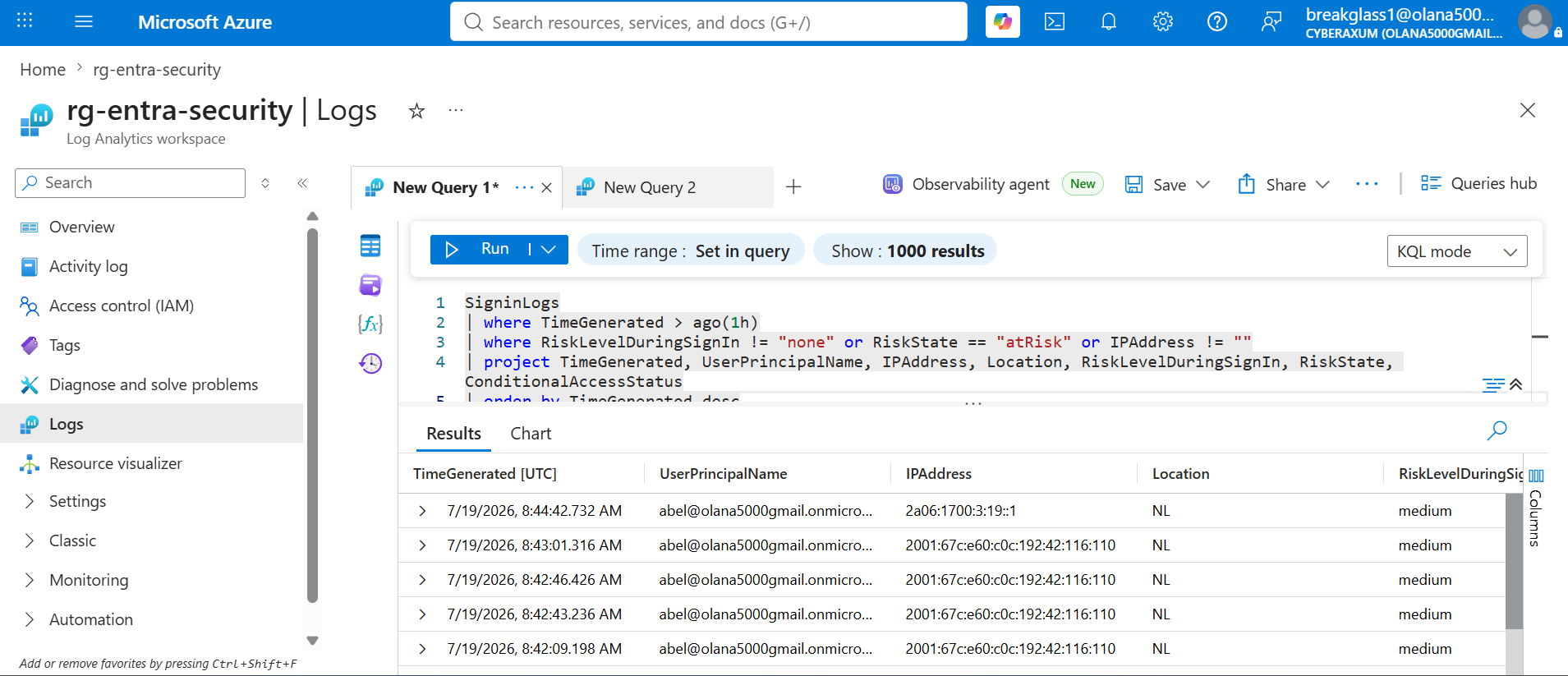
There it is. Sign-ins from a Netherlands Tor exit, scored medium risk, every one of them. This is the exact signal my risk patterns key on. Pattern 06 (medium sign-in risk requires MFA) would step in here, and pattern 04 would block outright on a high score. Because the policies are still report-only, the Conditional Access status reads "notApplied," which is correct. The risk got scored, the enforcement is just waiting for me to turn it on.
I also wanted to know if I could catch someone tampering with the policies themselves. So I toggled one policy off and back on, and checked the audit log.
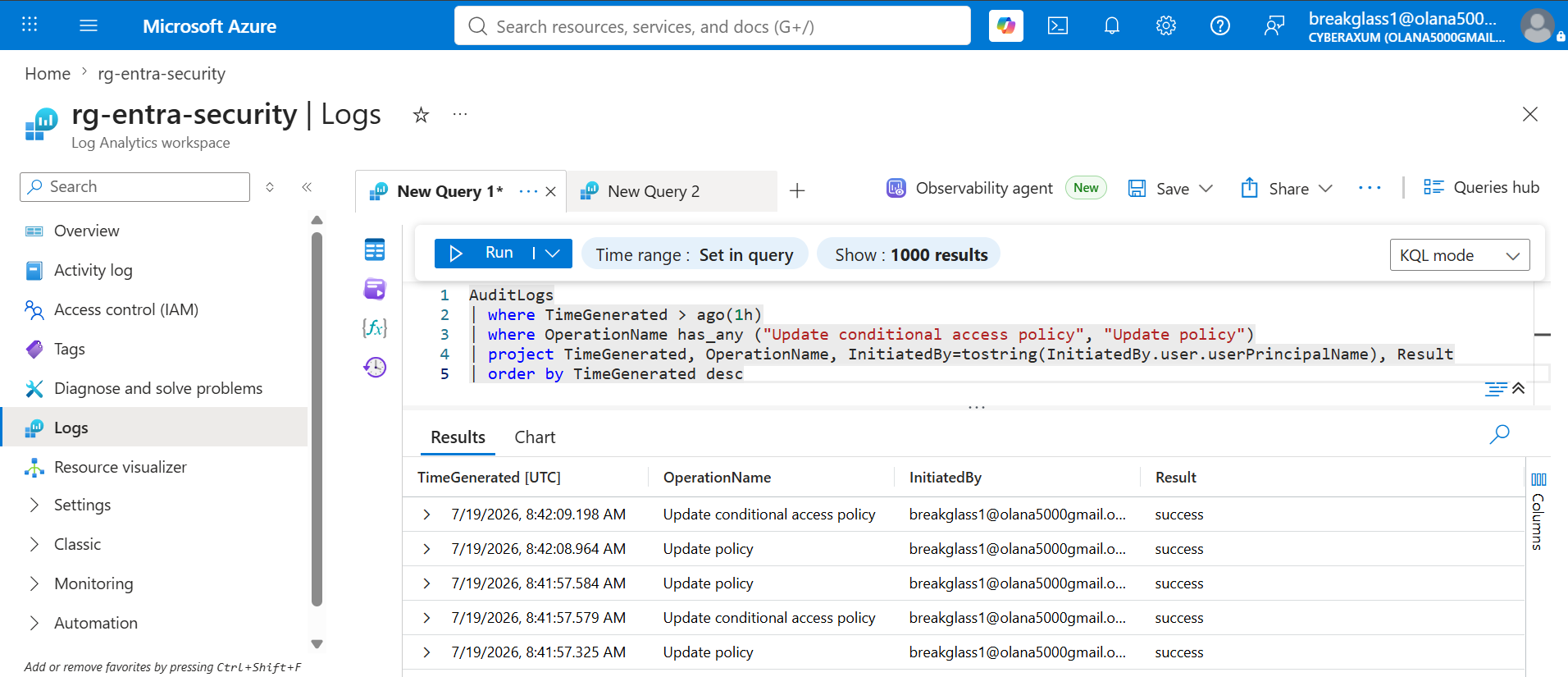
Every change captured, with the account that made it. If someone quietly weakens a policy, it shows up here with their name on it. Watch the watchers.
Where it landed
The library ended up at seventeen patterns. Sixteen are deployed to a live tenant. One (workload identity Conditional Access) is written and validated but not deployed, because it needs a separate paid license that the P2 trial does not include. I left it in as code and documented the license gate rather than fake a deployment I could not actually run. That honesty felt more useful than a fake green checkmark.
Coverage runs from the basics (block legacy authentication, require MFA, phishing resistant MFA for admins) through risk based access, device and location controls, app protection, guest restrictions, and privileged access management with just in time activation and recurring access reviews.
What I would tell someone starting this
Three things stuck with me.
Report-only is not a nice to have. It is the only reason you can build aggressive policies without breaking production. Build the break-glass accounts first, before you are tempted to write a single policy. And check the current Microsoft docs for anything you deploy, because the platform moves faster than the tutorials do. I caught two retirements this way that would have quietly shipped broken.
The full library, with the Terraform, the PowerShell, the ATT&CK mapping, and the monitoring queries, is on my GitHub: github.com/olanak/entra-conditional-access-library